
This article includes the following sections:
- 2.1 What is a Supplier ? – Defines a supplier and its role.
- 2.2 How to Identify Unique Suppliers – Explains how to distinguish suppliers.
- 2.3 What is the Data Needed for Suppliers? – Lists required fields for importing supplier data.
- Example of Some Suppliers Data – Shows a sample spreadsheet of supplier data.
2.1 What is a supplier?
Within Fairly Made data model, a Supplier is first an address. More precisely, supplier data covers all the stakeholders involved in your product lifecycle — from manufacturers and fabric mills to agents, wholesalers, and warehouses. This includes any entity that transforms, handles, or stores your materials and products throughout the supply chain.
This information is used for supply chain mapping and environmental analysis — essential for understanding your product's journey and calculating accurate environmental impacts.
💡 Tip: Suppliers can later update, modify and enrich their information directly with us — for example, they might provide more precise address details or declare certifications they hold.
💡 Tip: We integrate warehouses in our supplier database for complete traceability, though we never contact warehouses directly. If you have multiple warehouses, declare only your main warehouse.
Wholesalers should be declared when you or your suppliers buy in bulk, for example from fabric markets.
2.2 How to identify unique suppliers?
Each supplier in our system needs a unique identifier called a supplierRef — this is simply your internal code or reference for that specific supplier.
The key rule: If any supplier details differ, create a separate supplierRef. This is especially important for supplier groups with multiple locations, as each location needs its own reference since operations and capabilities may vary by site.
Let's illustrate this with an example:
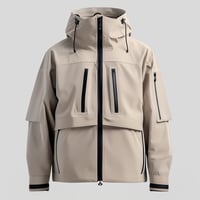
Consider a zipped coat (Product Reference: ZC-001) with suppliers across different locations and functions:
| supplierRef | address_country | category |
|---|---|---|
| FabricSupplier | CN | TRANSFORMATION - Weaving |
| SUP-B | IN | MANUFACTURING - Ready To Wear |
| MainWarehouse | FR | OTHER - Warehouse |
Even if "FabricSupplier" and "SUP-B" are part of the same corporate group, they need separate supplierRefs because they're in different locations (different country or even just different addresses with different email addresses).
2.3 What data is needed for Suppliers ?
This section details each field required when importing supplier data. Understanding these fields, their definitions, and their constraints is essential for a successful data import.
All fields marked with ⭐️ are mandatory.
💡 Need Help? If you don't have detailed information for some fields, contact your Fairly Made analyst for guidance on appropriate default values.
supplierRef ⭐️
Your internal code or reference for the supplier that makes it unique in our system.
- Format: Letters and numbers accepted, maximum 70 characters
category ⭐
Select the supplier's main activity from our predefined list (e.g., MANUFACTURING - Ready To Wear, TRANSFORMATION - Weaving, RAW MATERIAL - Harvesting). If your supplier performs multiple activities, select their primary function - the one you most frequently associate them with.
- Where to find options: Taxonomy SUPPLIER_CATEGORY
address_country ⭐
Select the country where this supplier unit is located from our predefined list.
Why this matters: Country location is essential for accurate environmental impact calculations, as different regions have varying energy grids, transportation distances that affect your product's footprint. Additionally, this information is used in our Supply Chain Intelligence module to assess location-based risks of forced labor and deforestation, and to display a visual map of all suppliers in your product supply chains.
- Where to find options: Taxonomy COUNTRY
- Format: ISO 3166-1 alpha-2 country codes (e.g., FR for France, IT for Italy)
contacts_email ⭐
Enter the email addresses of your contact persons at this supplier.
Why this matters: Contact information enables us to reach out directly to suppliers for additional data collection, verification, and collaboration on improving supply chain knowledge.
- Format: Must contain at least one "@" symbol
- 💡 Tip: If a supplier has multiple contact emails, attach them all to a single supplier rather than creating separate entries.
- Multiple contacts: Use semicolon ";" to separate multiple email addresses
🔌 API Users: Only the first email will be received via API. To send multiple contacts, create separate contact fields.
name
The commercial name of the supplier as it will appear in the Fairly Made platform.
- Format: Any text or numbers accepted
address_street
Enter the street address of the supplier's facility.
- Format: Any text or numbers accepted
address_postalCode
Enter the postal code of the supplier's facility.
- Format: Numbers only
address_city
Enter the city where the supplier's facility is located.
- Format: Any text or numbers accepted
contacts_name
Enter the names of your contact persons at this supplier.
- Format: Any text or numbers accepted
- Multiple contacts: Use semicolon ";" to separate multiple names
🔌 API Users: Only the first name will be received via API. To send multiple contacts, create separate contact fields.
contacts_phone
Enter the phone numbers of your contact persons at this supplier.
- Format: Numbers only
- Multiple contacts: Use semicolon ";" to separate multiple phone numbers
🔌 API Users: Only the first phone will be received via API. To send multiple contacts, create separate contact fields.
contacts_language
Select the preferred language(s) for communication with this supplier from our predefined list.
- Where to find options: Taxonomy SUPPLIER_LANGUAGE
- Multiple languages: Use semicolon ";" to separate multiple languages
- Common default: English can be used as a default if this information isn't available
certifications
Select any certifications or labels that this supplier holds from our predefined list.
Why this matters: Supplier certifications (such as GOTS, GRS, …) indicate their commitment to environmental and social standards. Note that certifications declared here are supplier-specific, not for individual materials or products.
- Where to find options: Taxonomy SUPPLIER_CERTIFICATIONS
- Multiple certifications: Use semicolon ";" to separate multiple certifications
- Important: This is declarative information. Suppliers will be asked to provide supporting documentation during data collection.
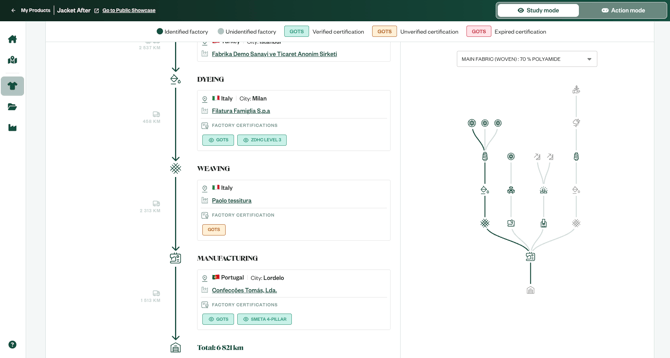
The supplier certifications are displayed on My Products page, on the detailed traceability tree
Example of some suppliers data
Below is a short example showing what a portion of your import data might be like for suppliers, illustrating some of the fields described above:
| Field name | ⭐️ Mandatory | Field Description | Example 1 | Example 2 |
| supplierRef | ⭐️ | Supplier's reference code used in your systems | SUP-B | Holi_IN |
| category | ⭐️ | Supplier's main type or activity | MANUFACTURING - Ready To Wear | TRANSFORMATION - Dyeing |
| address_country | ⭐️ | Country of the supplier's plant (ISO 3166-1 alpha-2 codes) | IN | IN |
| contacts_email | ⭐️ | Supplier's contact persons emails | chandradaya@diwali.com ; harsha@agenta.com | rajusakar@holi.com |
| name | Highly recommended | Commercial name of the supplier (will appear in platform / forms) | SUP-B | Holi Pvt. Ltd. |
| address_street | Highly recommended | Street address of the plant | 1st street | 3rd street |
| address_postalCode | Highly recommended | Postal code of the supplier's plant | 560001 | |
| address_city | Highly recommended | City of the supplier's plant | Bangalore | bangalore |
| contacts_name | Supplier's contact persons names | Chandra Daya | Raju Sakar | |
| contacts_phone | Supplier's contact phone numbers | 9112345678 | ||
| contacts_language | Language of the contact person | Kannada | ||
| certifications | Highly recommended (if any) | Different certifications of this supplier | GOTS ; GRS ; SMETA 4-PILLAR | GOTS ; SMETA 2-PILLAR |