The forms consist of three sections available in the My forms, as well as the option to attach a TC in the My documents tab.
Step 1 - Buyer’s declaration 📝
Objective: verify the accuracy of your buyer’s declaration (brand or downstream supplier) regarding the item you sold.
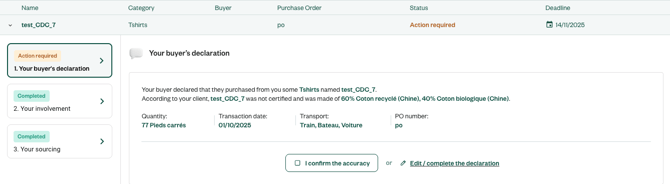
- If the statement is correct, click
I confirm the accuracyto proceed. - If the statement is inaccurate, click
Edit/complete the declarationand correct the incorrect item.
Step 2 - Your involvement 🏭
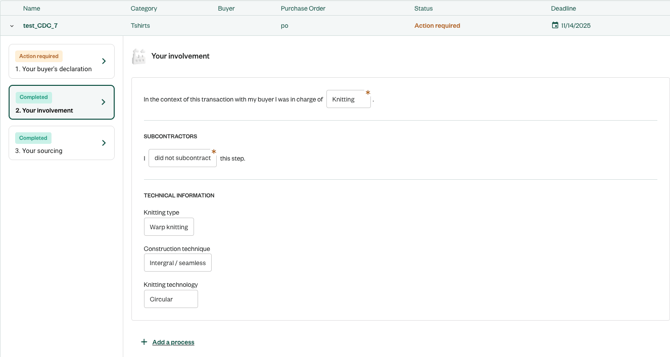
Objectif : understand the action you taken and any potential subcontracting on the item you sold.
-
Declare the operation that your company carried out in-house for the item sold.
If you are a trader, select
Trading. -
If you subcontracted this operation, please declare your subcontractors and the share of production they carried out for you.
Subcontractors are the factories that performed a specific step and to whom you supplied all necessary items.If this factory sourced materials itself, please declare it in Step 3 instead, which is dedicated to sourcing.
-
Technical information is very useful to ensure the environmental impact of the products is calculated using real data, so please provide it whenever possible.
-
If you carried out several steps internally for this same item, you can click
Add a processand fill in the section again.
Step 3 - Your sourcing 🧶
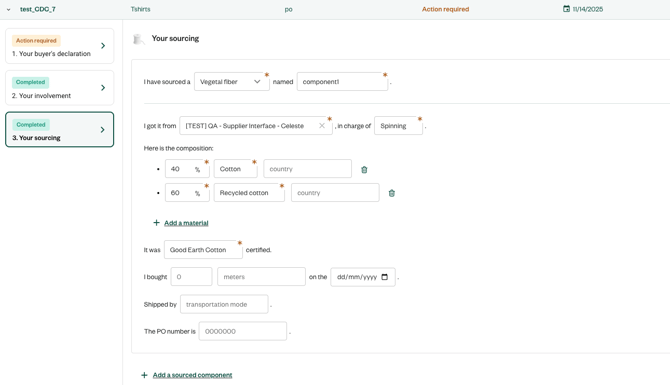
Objective: identify all purchased items that were necessary for the manufacture of the item you sold and the associated suppliers.
-
Declare the component category required to manufacture the item you sold, as well as a precise name/description of the article. This name/description should be easily recognizable by the associated supplier.
-
Declare the name of the supplier who sold you the item and the process they carried out in-house.
If your supplier is a trader, please select
Trading. -
Indicate the composition of the item you purchased as well as the country of the first operation made on the raw material:
- Harvesting for plant-based materials
- Breeding/capture for the animal-derived materials
- Recycling for the recycled materials
- Polymer synthesis for synthetic materials
- Mining for metal or stones
-
If the raw material is certified (GOTS, GRS, etc.), please indicate this. You will then be asked to upload the corresponding TC.
Please only download product/material certificates, not factory scope certificates in this section.
- Please provide the transaction details for this item. This will enable the supplier to more easily identify the order you placed with them (PO, date, quantity, shipping, etc.).
- For example, if to manufacture a jacket you needed a fabric for the body, a fabric for the lining, and buttons, you can create these three types of components: buttons, linings, main fabric (woven).
- If several identical items are used (same reference, composition, and supplier), it is not necessary to create multiple components. For example, if several identical buttons were used to make a jacket, please create only one component of type “buttons.”
- In case of multi-sourcing, you can create one component per supplier. For example, if you sourced part of the buttons from supplier A and part from supplier B, you can create a “buttons” component with supplier A’s information, then click
Add a sourced componentto create a second “buttons” component with supplier B’s information.
Step 4 - Transaction Certificates (if applicable) 📃
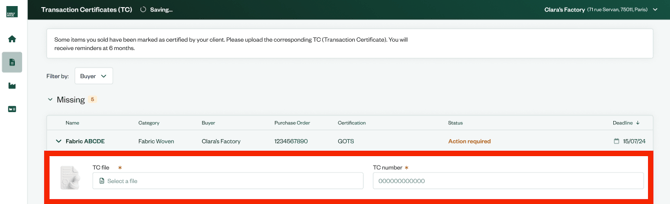
- If you declare that a material is certified in the form you filled out, you will receive a notification asking you to upload a TC - the notification appears in
My forms tab.

- The TC must be uploaded to the platform within a maximum of 6 months in
My documents tab.
For more information on how the testing phase will proceed, please find all the details here.