
What is SFTP?
SFTP (Secure File Transfer Protocol) is a secure method for uploading and downloading files between your systems and the Fairly Made platform. It provides an encrypted connection that ensures your data remains protected during transfer.
Benefits of Using SFTP
The SFTP solution provides you with:
- Secure file exchange - All data transfers are encrypted to protect your sensitive information
- Traced file exchange - Complete audit trail of all file transfers for compliance and monitoring
- Automatic pipelines - Set up automated workflows to extract and upload files directly from your systems (PLM, ERP, etc.)
Technical Requirements
Fairly Made SFTP Server Specifications
- Server URL: sftp.fairlymade.com
- Port: 2022
- Web Interface: https://sftp.fairlymade.com/web/client/login
File Upload Limits
- Maximum file size: 20MB
- Maximum files per directory: 100
- Supported file format: .csv only
- Upload frequency: Up to 100 uploads per day
File Naming Convention
Your files must follow this specific naming format: AccountName-Collection-ProjectName-ProjectType-FileType-VersionNumber-SendingDate.csv
Example: SANDRO-E24-AGEC-Products-v1-20.02.25.csv
What You Need to Provide
Before setting up SFTP access, please provide Fairly Made with:
- Username (your preferred username for the SFTP account)
- Client IP addresses (for security whitelist configuration)
Setup Process
Step 1: Receive Your Credentials
Fairly Made will provide you with:
- SFTP server URL
- Your unique username
- Initial password
Step 2: First Login & 2FA Setup
- Access the web interface at https://sftp.fairlymade.com/web/client/login
- Log in with your provided username and password
- Enable Two-Factor Authentication (2FA):
- Click on the 2FA setup option
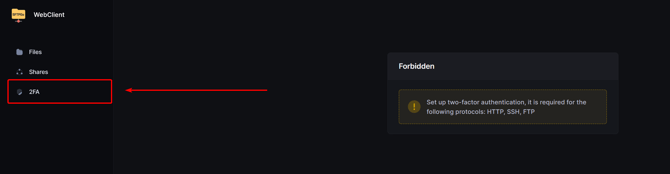
- Select
Defaultconfiguration - Select
HTTP,SSH, andFTPprotocols - Click "Enable"
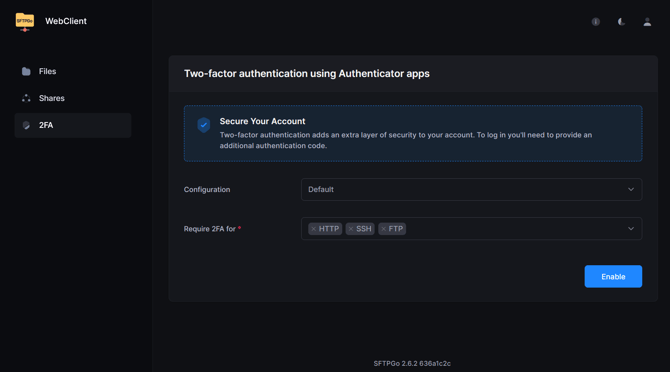
- Scan the QR Code with your 2FA application (Google Authenticator, Authy, etc.)
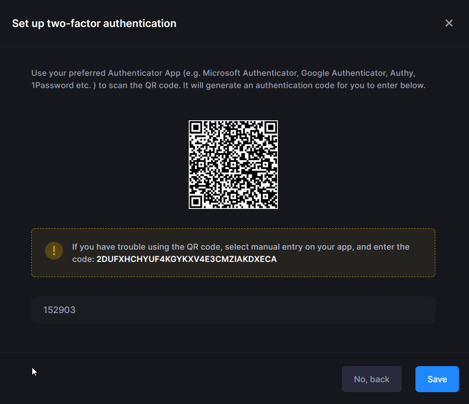
- Save the configuration
- Click on the 2FA setup option
Note: Enabling 2FA will automatically log you out
Step 3: Secure Login
For all future logins:
- Enter your username and password
- Provide the authentication code from your 2FA app
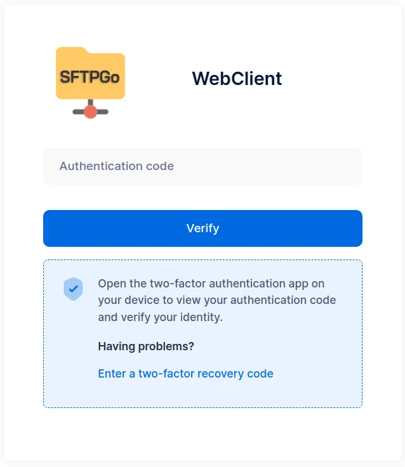
- Access the SFTP interface
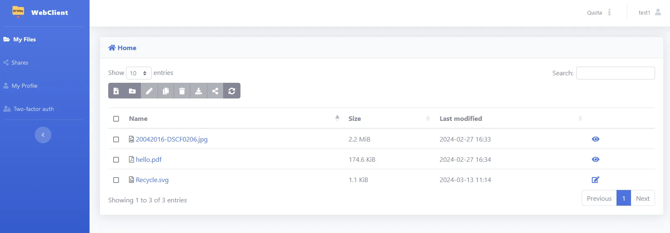
Step 4: File Upload Process
- Upload your files through the web interface following the naming convention
- Notify the Fairly Made team by sending an email confirming your file upload
- Our team will process your data and confirm successful import
Key Terms
- FTP/SFTP: File Transfer Protocol or Secure File Transfer Protocol - a method for transferring files over the internet
- IP Address: Internet Protocol Address - the unique location identifier for your server or computer on the internet
- SSH Key: Secure Shell Key - a cryptographic key that provides secure access to remote servers
- 2FA: Two-Factor Authentication - an additional security layer requiring a second form of verification
Need Help?
If you encounter any issues during setup or file transfer, contact your Fairly Made support team : clotilde.bazin@fairlymade.com or guillaume.babule@fairlymade.com.
We're here to ensure your data import process runs smoothly and securely.