Introduction
The Supply Chain Intelligence module gives you a comprehensive view of your traceability data and helps you gain key insights. It is divided into two main sections: Suppliers and Materials, each offering dedicated filters, visualizations, and data exports.
This guide is designed to help you navigate and understand the available reports. It explains how the data is used, what it represents, and how to effectively interpret and leverage each graph and filter.
Data Coverage and Update
Before diving into the details of each report, it’s important to understand how the underlying data is collected and used.
Only products that are part of a project within a Traceability Level 2 module are included in these reports, as they benefit from a complete traceability analysis that ensures reliable and consistent data. In addition, the following product categories are not represented in the reports: jewelry, watches, perfumes and components.
The data powering the reports is updated once a day, early morning (Paris local time). Any changes made after this update, such as adjusting product quantities in your Brand Settings, will be reflected in the reports the following day.
Suppliers Reports
What insights do these reports provide?
The "Suppliers" reports give you visibility over all the suppliers identified within the supply chains of your products.
Only suppliers identified in at least one traceability step of a product that has completed its analysis are included. Suppliers linked only to products currently being traced will not appear. Similarly, suppliers that are not linked to any traceability step, such as agents, are not shown.
How can I refine my analysis?
There are numerous filters you can use on the “Suppliers” reports to narrow down your search and analyze your supply chain.
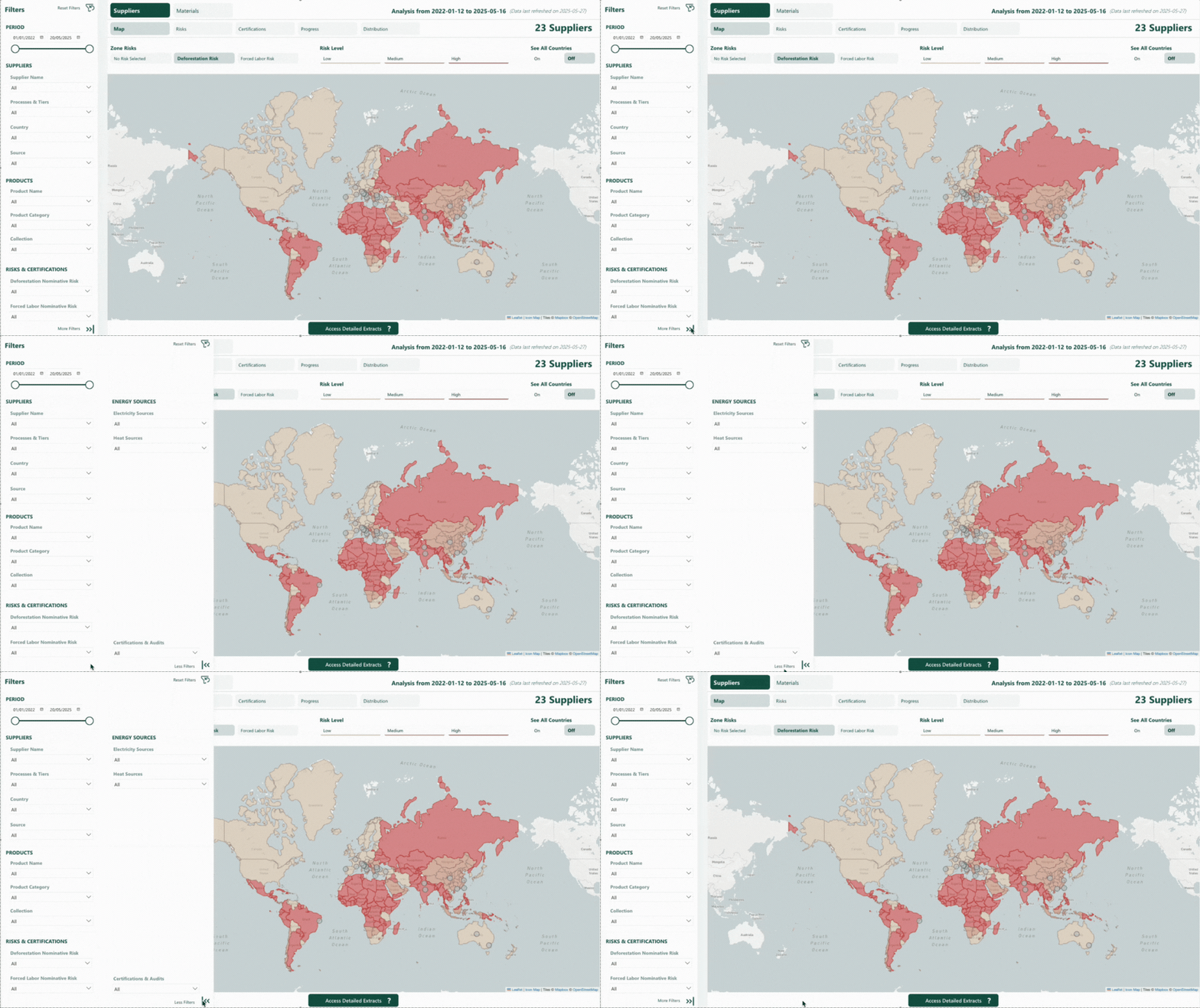
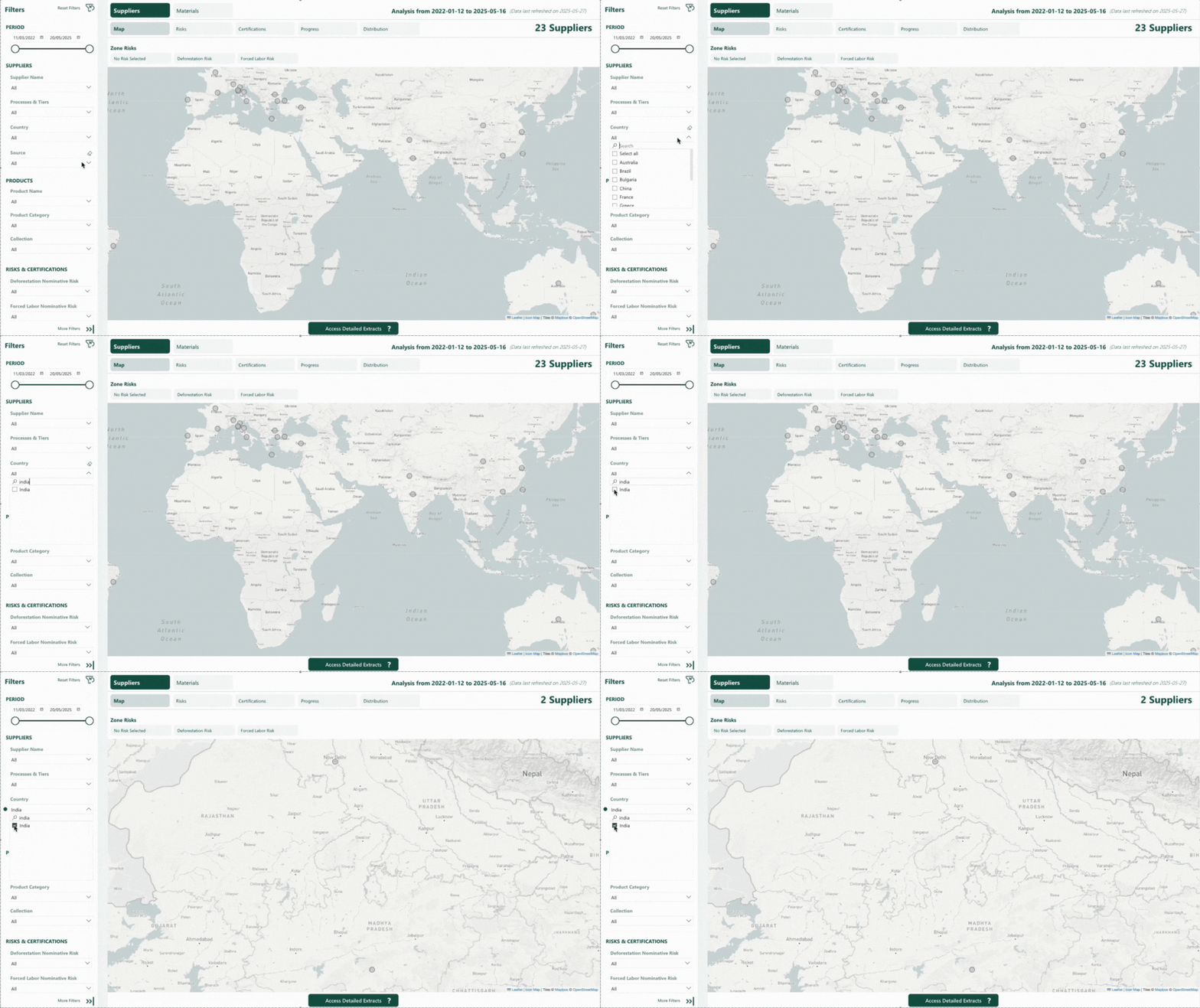
- Period: the date range when suppliers were first identified, whether declared by you or identified by Fairly Made.
- Supplier Name: the name of the suppliers in our system.
- Process & Tiers: the various processes in which the suppliers have been identified. One supplier can be identified on multiple processes. Processes are grouped by Tiers, allowing you to filter by a whole tier or only specific processes.
- Country: the country the suppliers are located in.
- Source: the source from which suppliers have been identified, whether declared by you or identified by Fairly Made.
- Product Name: the product names (or product reference if no name is available) for which suppliers have been identified within their supply chain.
- Product Category: the product categories for which suppliers have been identified within their supply chain.
- Collection: the collections of the products for which suppliers have been identified within their supply chain.
- Deforestation Nominative Risk: deforestation risks directly associated with a supplier.
- Forced Labor Nominative Risk: forced labor risks directly associated with a supplier.
- Certifications & Audits: certifications or audits of the suppliers.
- Electricity Sources: electricity sources of the suppliers’ factory, as they declared it.
- Heat Sources: heat sources of the suppliers’ factory, as they declared it.
How to interpret the graphs?
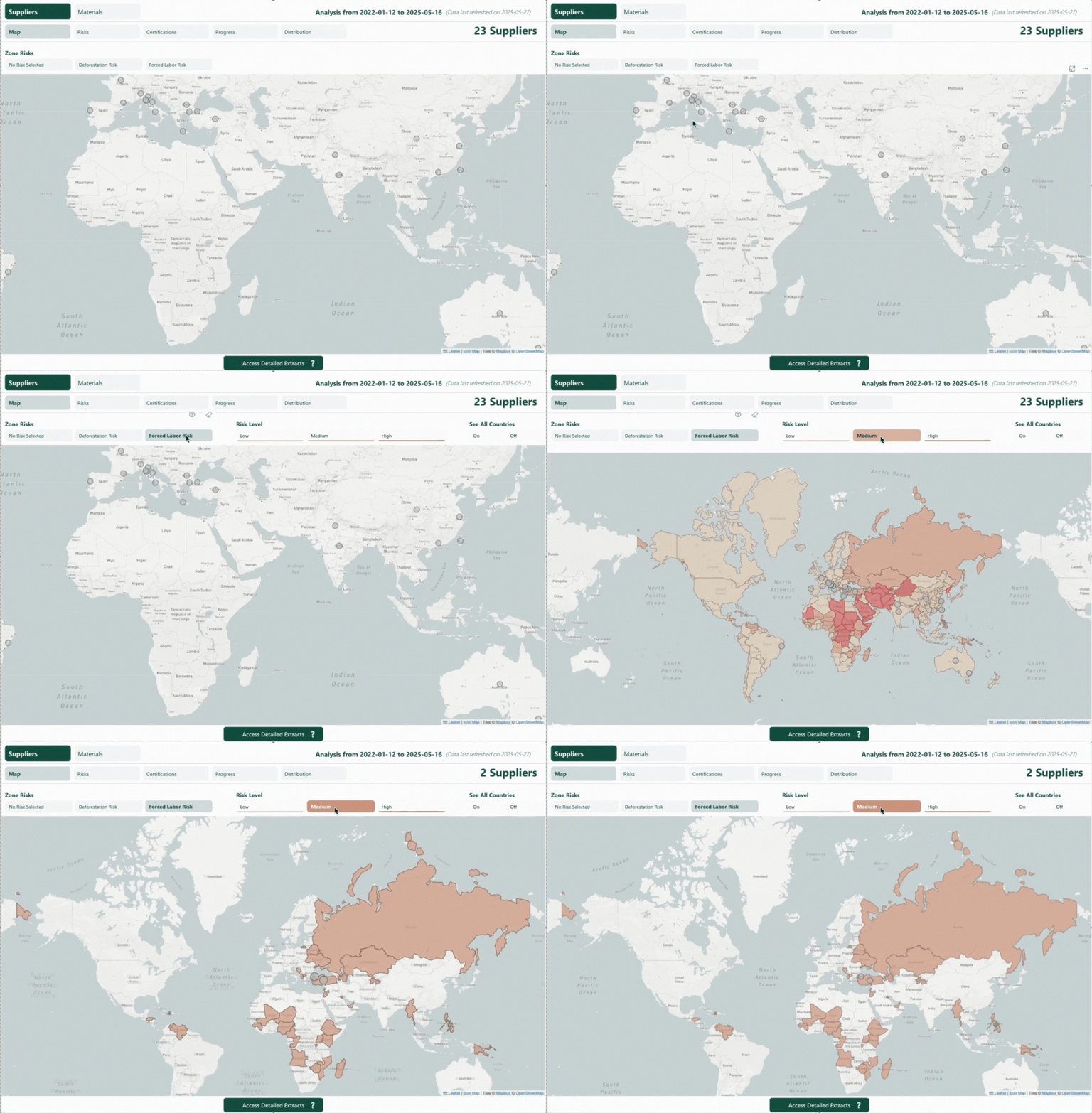
- Map: view the geographical location of your suppliers. You can also overlay zone risks (deforestation or forced labor), which relates to the risks associated with the country (or region for China) where the suppliers are located. The deforestation zone risks only apply to suppliers involved in processes with vegetal, artificial, leather, wood, animal or metal materials. Each zone risk can be filtered by level (Low, Medium and High). You can also disable risk filters by clicking on “No Risk Selected” to see a neutral map.
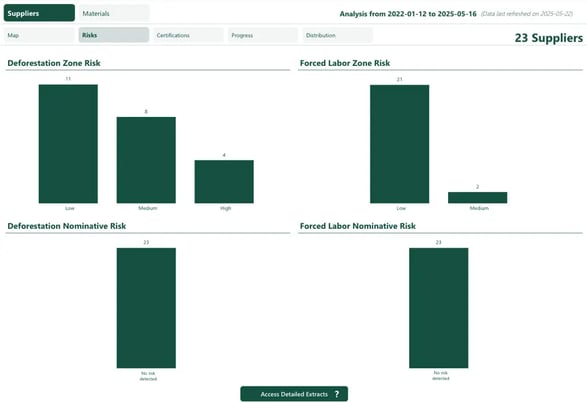
- Risks: understand how many suppliers are associated with each monitored risk and how they distribute across risk levels.
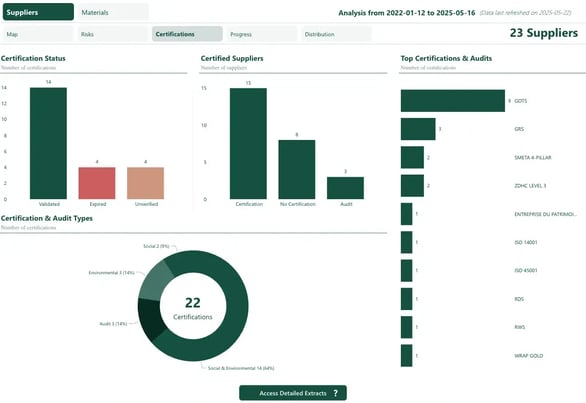
- Certifications: some graphs show counts of certifications (Certification Status, Top Certifications & Audits, Certification & Audit Types). Other (Certified Suppliers) display how many suppliers are certified. When a supplier has multiple identical certifications, only the most recent valid one is shown.
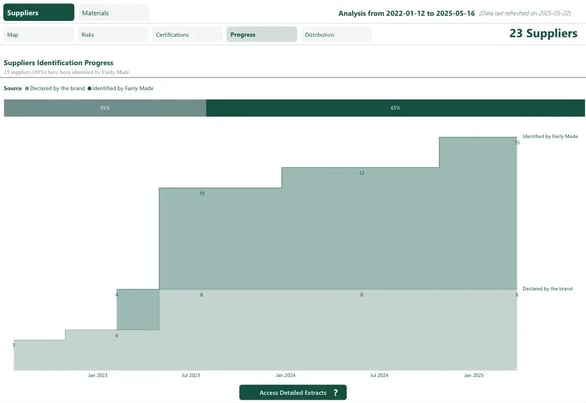
- Progress: monitor the evolution of your supplier identification over time, distinguishing between suppliers that you have declared and suppliers identified by Fairly Made. Each supplier is counted once, based on the date it was declared or identified for the first time (as per the “period” filter).
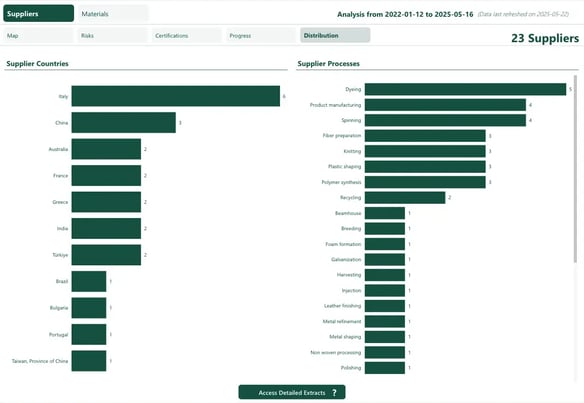
- Distribution: view how your suppliers are distributed by country and by process. Since a supplier may be involved in several processes, total process counts may exceed the total number of unique suppliers.
Materials Reports
What insights do these reports provide?
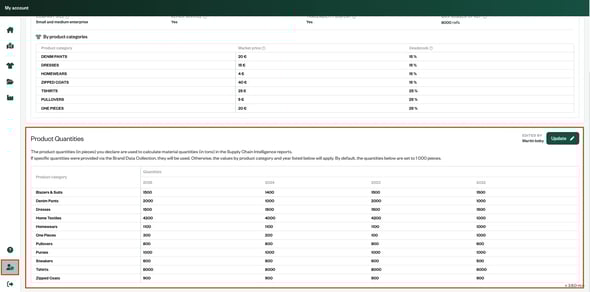
The “Materials” reports represent the total quantity of materials (in tons) from the composition of your products. It is calculated based on the product quantity you declared. If specific quantities were provided via the Brand Data Collection, they will be used. Otherwise, the values set on your Brand Settings (by product category and year) will apply.
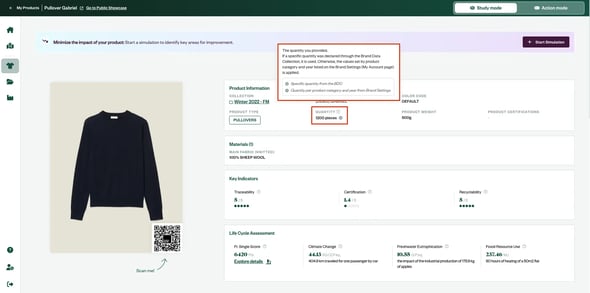
You can view the quantity used for each product directly on its page.
The materials are linked to the country or supplier identified at the very first step of their supply chain (e.g. cotton harvesting). If no supplier or country is identified on this step, the associated value will appear as “unknown”.
How can I refine my analysis?
There are numerous filters you can use on the “Materials” reports to narrow down your search and analyze your material sourcing.
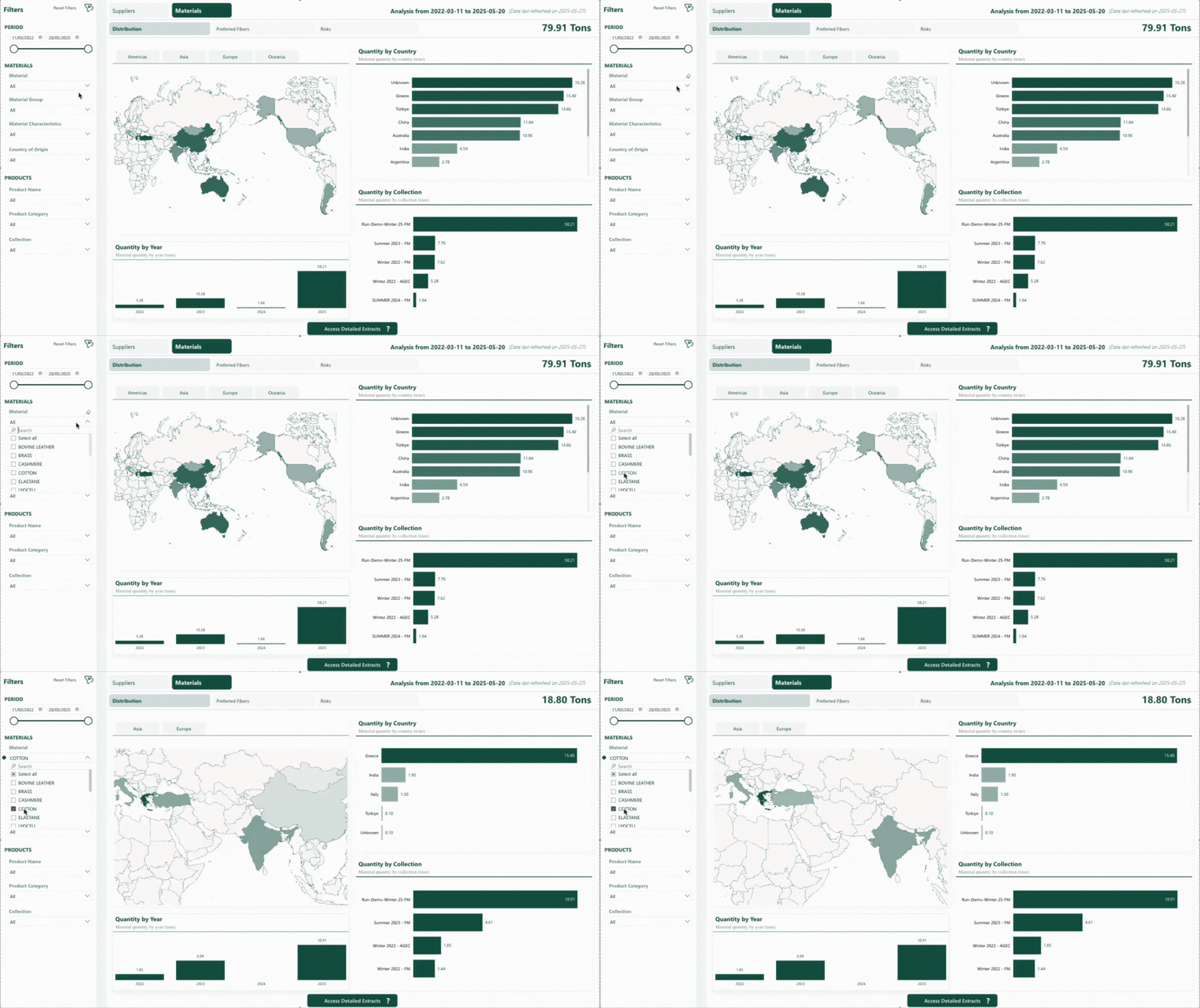
- Period: the creation date in our system of the products that include the materials in their composition.
- Material: the name of the materials (regardless of characteristics like recycled, organic, conventional…). Example: by filtering with the value COTTON you will be able to see conventional cotton, but also recycled cotton, organic cotton...
- Material Group: broader grouping of similar materials.
- Material Characteristics: conventional or preferential (recycled, organic…) materials
- Country of origin: countries of the very first step of each material (e.g. cotton harvesting) in its traceability chain.
- Product Name: the product names (or product reference if no product name is available) that include the materials in their composition.
- Product Category: the product categories that include the materials in their composition.
- Collection: the collections of the products that include the materials in their composition.
How to interpret the graphs?
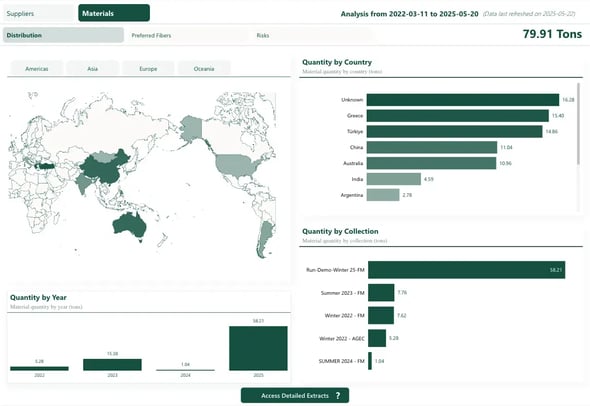
- Distribution: view how material volumes are distributed by country, collection, and year. The year is based on the creation date of the products that include the materials in their composition (as per the "Period" filter).
- Preferred Fibers: view the share of the different characteristics of the materials. Preferred fibers are those that are not conventional.
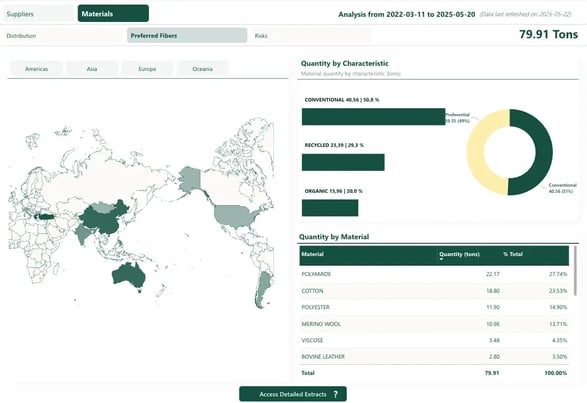
- Risks: understand the material quantity associated with each monitored risk and how they distribute across risk levels.
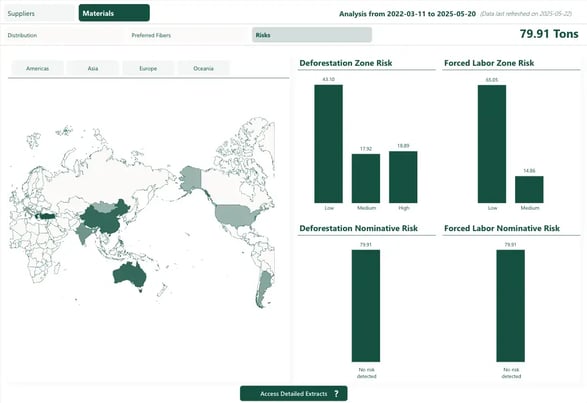
Risks
What types of risks and sources are covered?
The reports include two main types of risks: deforestation and forced labor, identified through multiple external sources such as NGO reports, laws or non-profit environmental organizations… The monitored sources are:
- Fashion Crimes Report - Earthsight
- The Hidden Price of Luxury - Earthsight
- Global Slavery Index
- Hot Button / NextGen - Canopy
- IDAT - Forest Trends
- UFLPA Entity List
- WRO Dashboard
- Xinjang Prison Labor - Kharon
- EUDR - European Union Deforestation Regulation
- Pambianconews
For more details on deforestation risks, please refer to this article. To learn more about forced labor risks, see this article.
Where do the risks originate?
Each risk can have two origins:
- Zone risk: This risk is linked to the geographic area , either the country (or region for China) where the supplier is located or the country of origin of the material if the supplier is unknown. It reflects the general level of risk present in that location.
- Nominative risk: This applies when a specific supplier is explicitly named as presenting a risk in a source.
Note that zone risks of deforestation only apply to suppliers involved in material-level processes using vegetal, artificial, leather, wood, animal or metal fibers. This is because deforestation risks are only relevant at the origin of raw materials and for certain material types.
For example:
- A supplier located in a country with a high risk of deforestation but only involved in a knitting process will not be flagged, as knitting is not considered a material-level process.
- Likewise, a supplier located in a country with a high risk of deforestation but only involved in a material-level process on polyester will not be flagged, as polyester is not a concerned material.
How are risk levels classified?
Each risk type is broken down into three levels:
- Zone risks: low, medium, or high, based on how each source evaluates the country or region.
- Nominative risks: no risk detected, presumed risk, or identified risk, depending on how clearly the supplier is named and flagged in external sources.
If you want to explore more details:
- Refer to the “Risk Details” from the “Suppliers” reports to better understand risks linked to your suppliers
- Refer to the “Risk Details” from the “Materials” reports to better understand risks linked to your materials
How is the highest risk level determined?
When multiple sources report risk information for the same country or supplier, only the highest level of risk for each type (deforestation or forced labor) is retained.
- For zone risks, if several sources assign different risk levels to the same country or region, the highest level is used.
- For nominative risks, if a supplier is mentioned by multiple sources, the most severe risk level reported is applied.
What if no risk is detected for a supplier or a zone?
Some countries may not be flagged by any of the monitored risk sources. In such cases, a default “Low” level is assigned for both deforestation and forced labor risks.
Likewise, if a supplier is not flagged by any of the monitored risk sources, they are assigned a default level of “No risk detected” for both types of risk.