
This article includes the following sections:
- 4.1 What is a Component? – Defines a component and its role.
- 4.2 How to Identify Unique Components – Explains how to distinguish components.
- 4.3 What is the Data Needed for Components? – Lists required fields for importing component data.
- 4.4 Dependencies on Other Entities – Describes links between components and other entities.
- Example of Some Component Data – Shows a sample spreadsheet of component data.
4.1 What is a component ?
Component data covers all the individual elements that make up your products — from main fabrics and linings to hardware like zippers, buttons, outsoles, and uppers. Each component is made of one or multiple raw materials such as cotton, bovine leather, metal, polyamide, etc.

This information is used for detailed environmental impact analysis and comprehensive supply chain mapping — essential for calculating precise environmental footprints, understanding material sourcing impacts, and providing granular transparency about your products' composition.
💡 Tip: Think of components as the building blocks of your finished products, each with their own material composition and supply chain characteristics.
💡 Tip: Focus on declaring the heaviest components per product — typically main fabrics and linings. Small elements like threads or labels have minimal environmental impact and can be omitted.
4.2 How to identify unique components
Each component needs a unique identifier called a componentRef representing specific characteristics including composition, category, and supplier.
Important: If any component characteristics differ, create a separate componentRef. For the same componentRef, all other fields must be identical.
💡 Tip: For Fully Factored Products: If you work with finished products and lack detailed component information, submitting a components list is optional. The Fairly Made platform will utilize our framework to compile the components list for you.
Let's illustrate this with an example:
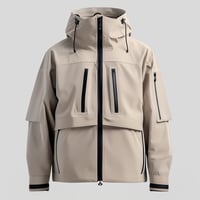
Consider the ZIPPED COAT with Product Reference ZC-001 that has 4 different components:
| componentRef | type | category |
|---|---|---|
| POL-RPOL-WOV-345 | TEXTILE | MAIN FABRIC (WOVEN) |
| RPOL-WOV-350 | TEXTILE | LININGS |
| ZIP_001_897 | PLASTIC | ZIPS |
| RPOL-FOA-999 | PLASTIC | STUFFINGS |
| POL-RPOL-WOV-345_Lining | TEXTILE | LININGS |
Now imagine you want to use the same fabric as the main fabric (POL-RPOL-WOV-345) but for the lining. Since only the componentRef makes the component unique in the platform, you would need to create another reference — for example: POL-RPOL-WOV-345_Lining.
4.3 What data is needed for Components ?
This section details each field required when importing component data. Understanding these fields, their definitions, and their constraints is essential for a successful data import.
All fields marked with ⭐️ are mandatory and fields marked with ★ are mandatory for some features.
💡 Need Help? If you don't have detailed information for some fields, contact your Fairly Made analyst for guidance on appropriate default values.
componentRef ⭐
Your internal code or reference name for this component. This code makes each component unique in the Fairly Made platform.
- Format: Letters and numbers accepted, maximum 70 characters
supplierRef ⭐
Your internal reference code for the supplier of this component.
Why this matters: The supplier referenced here will receive Material Forms to gather technical information about the components. For Finished Products suppliers, indicate your manufacturing supplier; otherwise, indicate the component supplier (e.g. fabric supplier).
- Format: Must exactly match an existing supplier reference from your supplier data
productRef ⭐
Your internal code or reference name for the product style that uses this component.
- Format: Must exactly match an existing product reference from your product data, maximum 70 characters
productCollectionRef ⭐
The name or reference of the collection the product belongs to.
- Format: Must exactly match an existing collection reference from your product data
type ⭐
Select the component type from our predefined list (e.g. TEXTILE, LEATHER, …)
- Where to find options: Taxonomy COMPONENT_TYPE
category ⭐
Select the component category from our predefined list that best describes this component.
- Where to find options: Taxonomy COMPONENT_CATEGORY
composition ⭐
The exact composition of the component in percentage for each raw material.
Why this matters: The composition you provide will be compared with supplier declarations. In case of discrepancies, you can choose which composition to retain for calculations during a specific phase of the analysis.
- Where to find options: Taxonomy RAW_MATERIALS
- Format: Must follow format: [NUMBER]% [RAW_MATERIAL] ; [NUMBER]% [RAW_MATERIAL]
productColorCode
The code or reference for the product's color. Required only if you've filled this field in your product data.
- Format: Must exactly match an existing product color code from your product data
supplierComponentCode
Your supplier's code or reference for this component. This will be the name of the form your supplier receives during Supplier Data Collection, helping them identify the specific component.
- Format: Letters and numbers accepted
lotReferences
The references of your component's lots, if available.
- Format: Letters and numbers accepted
- Multiple lots: Use semicolon ";" to separate multiple references
certifications
Certifications for the component itself.
- Where to find options: Taxonomy COMPONENT_CERTIFICATIONS
- Multiple certifications: Use semicolon ";" to separate multiple certifications
componentWeight
The weight in grams of the component in the linked product.
Why this matters: Essential for LCA calculations and AGEC-related claims. The sum of all component weights should not exceed the total product weight.
- Format: Numbers accepted (decimals allowed)
💡 Need Help? Since this field is not mandatory, if you don't have this information, the Fairly Made platform will apply a weight based on the component category using our Framework.
componentPrint
Indicate if the component is printed.
- Format: Answer "1" (Yes) or "0" (No)
🔌 API Users: Type is “boolean”, so please indicate true (Yes) or false (No)
printingCountry
The country where the component was printed (Ready-to-Wear only).
Why this matters: This information is particularly important in AGEC context for regulatory compliance.
- Where to find options: Taxonomy COUNTRY
- Format: ISO 3166-1 alpha-2 country codes
dyeingCountry
The country where the component was dyed (Ready-to-Wear only).
Why this matters: This information is particularly important in AGEC context for regulatory compliance.
- Where to find options: Taxonomy COUNTRY
- Format: ISO 3166-1 alpha-2 country codes
knittingCountry
The country where the component was knitted (Ready-to-Wear only).
Why this matters: This information is particularly important in AGEC context for regulatory compliance.
- Where to find options: Taxonomy COUNTRY
- Format: ISO 3166-1 alpha-2 country codes
weavingCountry
The country where the component was woven (Ready-to-Wear only).
Why this matters: This information is particularly important in AGEC context for regulatory compliance.
- Where to find options: Taxonomy COUNTRY
- Format: ISO 3166-1 alpha-2 country codes
shoeFinishingCountry
The country where the component was finished (Shoes only).
Why this matters: This information is particularly important in AGEC context for regulatory compliance.
- Where to find options: Taxonomy COUNTRY
- Format: ISO 3166-1 alpha-2 country codes
shoeStitchingCountry
The country where the component was stitched (Shoes only).
Why this matters: This information is particularly important in AGEC context for regulatory compliance.
- Where to find options: Taxonomy COUNTRY
- Format: ISO 3166-1 alpha-2 country codes
4.4 Dependencies on other entities
Suppliers
The Component data includes references to suppliers via the supplierRef field.
For your component import to be successful, the reference codes you provide in the supplierRef column must exactly match reference codes of suppliers that you have already imported into the Fairly Made system via the SUPPLIERS data tab.
The system uses this reference code (supplierRef) to look up and link the component to the corresponding supplier entries already in its database.
Products
The Component data includes references to products via the productRef, productColorCode and productCollectionRef fields to link components to the products in which they are used.
Similar to suppliers, for your component import to be successful, the reference codes you provide in the productRef, productColorCode and productCollectionRef columns must exactly match reference codes of product items that you have already imported into the Fairly Made system via the PRODUCTS data tab.
If a component is used in multiple products, you have two options:
- Spreadsheet users: Add a separate line for each product where the component is used
- API users: Send the component data separately for each product combination (productRef + productColorCode + productCollectionRef)
All individual references must exist in your imported Products data.
Ensuring Data Linkage
The timing of when you imported the Suppliers and Products data does not matter, provided the references are consistent. What is important is that before you import a Component any supplierRef, productRef, productColorCode and productCollectionRef mentioned and that refers to this Component should already exist in the system from previous SUPPLIERS and PRODUCTS imports.
Example of some components data
Below is a short example showing what a portion of your import data might be like for a few components, illustrating some of the fields described above:
| Field name | ⭐️ Mandatory | Field Description | Example 1 | Example 2 | Example 3 | Example 4 |
| componentRef | ⭐️ | Your internal code or reference name for this component | Main Fabric Woven - JACKET AFTER | Lining - JACKET AFTER | Stuffing - JACKET AFTER | Upper - SNEAKERS NOAH |
| supplierRef | ⭐️ | Your internal reference code for the supplier of this component | Paolo Tessitura | Paolo Tessitura | Scandicci Trims | João Fábrica de Calçado, Ltd. |
| productRef | ⭐️ | Your internal code or reference name for this product style | ZC-001 | ZC-001 | ZC-001 | S-010 |
| productCollectionRef | ⭐️ | The name or reference of the collection the product belongs to at the time of analysis | WINTER 2025 | WINTER 2025 | WINTER 2025 | SPRING 2025 |
| type | ⭐️ | The component type | TEXTILE | TEXTILE | PLASTIC | LEATHER |
| category | ⭐️ | The component category | MAIN FABRIC (WOVEN) | LININGS | STUFFINGS | UPPERS |
| composition | ⭐️ | The exact composition of the component | 70% POLYAMIDE;30% RECYCLED POLYAMIDE | 100% RECYCLED POLYAMIDE | 100% RECYCLED POLYESTER | 100% BOVINE LEATHER |
| productColorCode | Mandatory if you filled it at Products level | The code or reference for the product's color | BEIGE | BEIGE | BEIGE | DEFAULT |
| supplierComponentCode | Highly recommended | Your supplier code or reference for this component | POL-RPOL-WOV-345 | RPOL-WOV-350 | RPOL-FOA-999 | |
| lotReferences | Highly recommended | Please indicate the references of your component’s lots (if any) | 12345 | |||
| certifications | Highly recommended (if any) | The certifications of the component itself | GRS | GRS | GRS | LEATHER STANDARD BY OEKO-TEX |
| componentWeight | Highly recommended | The weight in grams of the component in the linked product | 478.32 | 162 | 252 | 98.84 |
| componentPrint | Is the component printed? | NO | NO | NO | NO | |
| printingCountry | Only for RTW. The 2-letter country code (ISO 3166-1 Alpha-2) where the component was printed | |||||
| dyeingCountry | Only for RTW. The 2-letter country code (ISO 3166-1 Alpha-2) where the component was dyed | IN | IN | |||
| knittingCountry | Only for RTW. The 2-letter country code (ISO 3166-1 Alpha-2) where the component was knitted | |||||
| weavingCountry | Only for RTW. The 2-letter country code (ISO 3166-1 Alpha-2) where the component was woven | IN | IN | |||
| shoeFinishingCountry | Only for Shoe. The 2-letter country code (ISO 3166-1 Alpha-2) where the component was finished | BR | ||||
| shoeStitchingCountry | Only for Shoe. The 2-letter country code ((ISO 3166-1 Alpha-2) where the component was stitched | BR |