
How to retrieve the URL of the widget ?
Directly on your dashboard (https://app.fairlymade.com/products), you can download the "Product" CSV file which provides showcaseLink for each product and that you can embed on your website.
You can find more information on our main article about your Fairly Made digital product passport
What is an iFrame?
According to MDN docs: The <iframe> HTML element represents a nested browsing context, embedding another HTML page into the current one.
Fairly Made® allows you to embed its widget/showcases with an iFrame on your product page by using a reference link.
Showcase integration using iFrame
These few steps will guide you to do so using the two most popular Content Manager Systems (Shopify and Wordpress) :
1. First, go to the admin interface to edit your website.
2. Then, go on the edit section for your specific web page.
-
Shopify
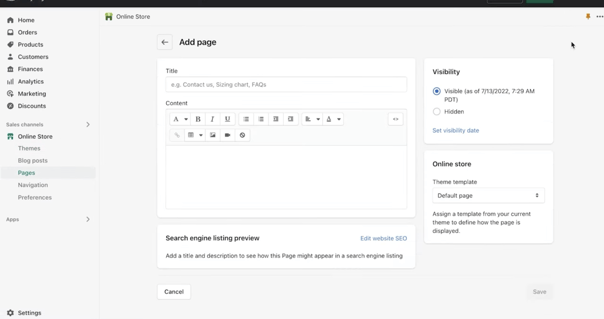
Click on the “page” tab, on the left panel then select the page in which the Fairly Made® content should be inserted
-
Wordpress
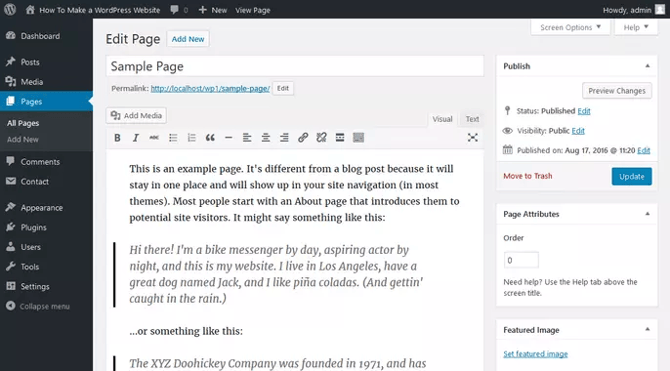
On the left panel click on the “pages” tab and select the page in which the Fairly Made® content should be inserted
-
Google Tag Manager
3. In that edit section, select the html code mode.
-
Shopify
The content box contains the formated content of your page. To access the code tab, click on the
<>button on the top left corner of the edit box. -
Wordpress
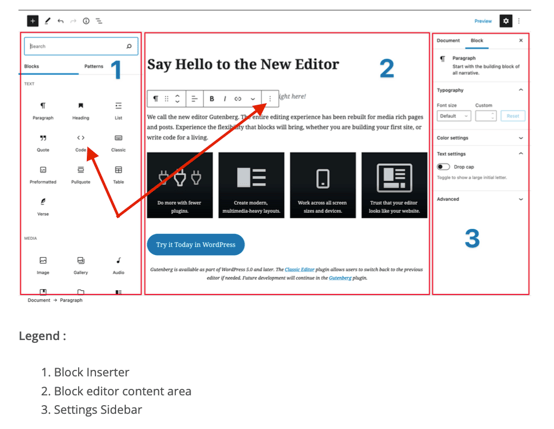
-
Alternatively, the html code of the entire page can be edited as shown below :
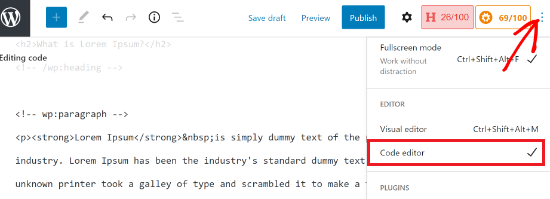
(source : https://www.wpbeginner.com/wp-tutorials/how-to-edit-html-in-wordpress-code-editor-beginners-guide)
-
Google Tag Manager
4. Once you are in html edition mode, paste the following code
<iframe src="YOUR_FAIRLY_MADE_PRODUCT_SHOWCASE_URL" style="width:100%;min-height:800px;"></iframe>
Where YOUR_FAIRLY_MADE_PRODUCT_SHOWCASE_URL should be replaced by the URL link of the Fairly Made® product showcase web page. You might want to adjust the height parameter to your convenience.
⚠️ We recommend not to preload our Showcase (meaning that you load the iFrame at the same time as your product e-commerce page, in shadow). Despite this, if you decide to pre-load we will disable web tracking analytics and will not be able to provide you with statistics on visits on our showcases.
Query Parameters
You can add a query parameters to the link (e.g. https://link.fairlymade.com/:linkRef?lang=en)
| URL Parameter | Values | Description |
|---|---|---|
| lang | en fr it us es |
Optional. Force default language. If no lang parameter is specified, the default language will be the browser’s language. |